Ableton Live 7 MIDI Problems
A lot of people are having trouble with Ableton Live 7. This is especially true with MIDI functionality. It stems from the fact that Live 7 defaults to the DirectMusic MIDI interface. Apparently DirectMusic then has to do emulation because the standard Microsoft MIDI driver is not DirectMusic native (Microsoft, we will never understand you..). This is true for most USB MIDI devices.
This was affecting me by introducing high latency into MIDI I/O with my Novation Remote 61 SL and Akai MPD24. Initially all seemed well. Gradually, hitting a note on my keyboard would get slower and slower until the point where it was unusable. We’re talking hit a key and wait tens of seconds before the note plays.
Luckily the fix is pretty easy. Open up the MIDI preferences, and click the small arrow next to all your inputs and outputs. Now simply click the port type and it will change from DirectMusic to MME.
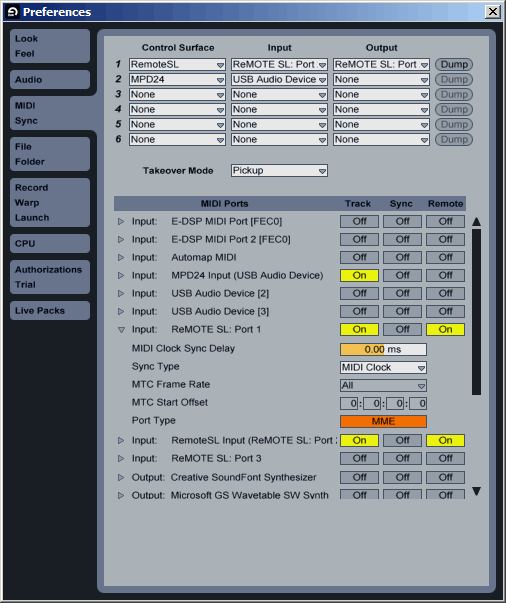
According to the forums, there are no drawbacks to this approach. It is unfortunate that Ableton decided to make this a default since so many people have had troubles with it.
Related posts:
- NIN Echoplex live rehearsal One of my favorite blogs, Create Digital Music, ran a...
- Windows 7 has definite backlight problems (“Black Screen of Death”) There is definitely a problem in Windows 7 RTM with...
- USB 3.0 on Linux Take a look at this Intel developer’s blog: http://sarah.thesharps.us/2008-12-07-13-35.cherry The...

December 26th, 2008 at 2:55 pm
Hey I was wondering if you could help me with a problem I’m having with this Oxygen 8 v2 keyboard I’m attempting to use with Live.
I’m having a problem in which the Input column in the preferences -> midi sync page is completely greyed out, and as a result I can’t use the oxygen keyboard as an external controller. Strangely, windows seems to think it’s installed and running properly although none of the audio programs detect it, most importantly Live. Please help? =)))
December 26th, 2008 at 5:45 pm
Hi,
MIDI drivers should be built in to Windows, but M-Audio may have their own that let you use the audio feature. MIDI sync is also not necessary for using the device as a controller, the PC will function as a time source just fine. Perhaps the Oxygen doesn’t have timing built in? Also, are there multiple MIDI channels, such as one for the Oxygen’s keys and one for the external MIDI ports? I need more info to help, but hopefully this points you in the right direction.
December 26th, 2008 at 6:47 pm
After troubleshooting for a while I’ve decided that it’s Windows that’s screwing it up. It skips the step where the Found New Hardware wizard asks me to install software automatically and instead goes straight to “Your hardware is installed and ready to use”, and consequently Ableton doesn’t recognize it. Do you know how I could make it so Windows doesn’t do that step automatically?
ps. It’s connected via USB.
December 27th, 2008 at 8:51 pm
Never mind
Got it figured out =]]
January 20th, 2009 at 9:17 am
I just bought an Oxygen 8 as an Ableton 7 controller and keyboard. I can create notes with it just fine. I can select it as the keyboard and hear things just fine when poking around but, any control functions show up as midi data, just like pressing a key, not as controller data. I turn knobs, run the slider for volume or modulation wheel and all show as midi data in Ableton but they don’t control anything.
To say there is no information on all this for a non-musician like me is silly. There is literally nothing on how to set all this up online or in the manuals. What’s up with that anyway? Sort of suck for folks like me who don’t do this all the time for a living. I’m a short filmmaker and I want to use the combo to laying effect sounds. This is over my head so far.
So question is then, what do I do now to make the controls functional? I am running Ableton 7.03 I believe (not on this machine) and the Oxygen 8 drivers from the M-Audio legacy section on the website.
Any help would be appreciated. Win XP32 fully up to date by the way.
S.
January 20th, 2009 at 6:20 pm
Hi Sean,
By midi data, do you mean that the knobs play notes, or you just see the midi indicator in Ableton light up? If the latter, that is the standard setup. Off the top of my head, I don’t know of the Oxygen has any “templates” or “mappings” built for Live (check the manual). What you want to do however is hit the MIDI button to enter mapping mode. The screen should change to highlight all the controls, and if you click one then move a control on the Oxygen it will “map” and remember the association. When you exit mapping mode (hit MIDI again), the control will then operate on that parameter.
All this stuff is kind of crazy at first but Live has one of the cleanest interfaces I’ve seen. With a couple software instruments it should be perfect for what you are trying to do. I recommend following the tutorials or picking up a book since either of those would cover this and other basic use.
January 23rd, 2009 at 2:13 pm
Hi Kev,
I have a problem maybe you could me with. I’m running ableton 7 v1, and I have an aoudiokontrol1 native instruments interface. I’m using an akai mpk49 and a bitstream 3x as a controller. I have a fairly new inspiron 1525 running windows xp. My problem is- whenever I use a controller function, slide a knob or whatever, the cpu spikes and I get audio drop out BIG time. So there’s lots of glitching and popping and It’s just not possible to work with it. I’m getting so fed up with technical issues now.
Can you help?
January 23rd, 2009 at 6:38 pm
Hi Karl,
First off, which driver and what latency settings are you pushing to the audiokontrol? ASIO is what you want. Latency, you will have to play with to find a balance between CPU usage. Probably 10-15ms is good for debugging right now, and can be dropped later.
Next, make sure you have the latest version, 7.0.14 right now.
Finally, try changing the midi drivers for everything as I described in my post. Hopefully this combo gets you up and running smoothly. I agree, these kinds of bugs are really annoying and take a lot of the fun out of using software for music.
January 29th, 2009 at 12:04 pm
Dear fellow music lovers,
I have this problem with my Behringer BCR 2000, and this is the first post I ever see that seems about more or less the same issue.
Here’s the deal: at first, the BCR and its midi driver work pretty much ok, although it’s best to start windows with the device already connected. Very seldom, it will fail (for example, when I attach it to another usb port, ???)
After a month or 2, this starts happening from time to time: after connecting the BCR it’s detected by windows and by its PC application (bcredit) just fine. When I launch ableton live (ever since 6) the knobs jump to their position as always, BUT after I turn one knob, all control is lost. That’s when it becomes really imported to boot windows with the device connected. So I reboot and try again. Funny thing is: if MIDI control is okay for about 1 minute, it will not fail for the rest of the session.
From that point, it starts happening more and more. First 1 in 10 times, untill after a few weeks, it’s just every time and the controller becomes completely unusuable. Totally formatting my system helps for one or two months, then it happens again. It’s been like that for over 2 years now.
I am off course quite tired of this, especcially since it affects the performance of other controllers as well (growing latencies are often a symptom when it gets to its worse point). But I’m convinced its the BCR that causes this, because it’s the first one I had. I have also tested other software such as standalone synths, traktor,… and it’s just the same.
The controller has the latest firmware version, latest drivers and is off course set up correctly in ableton. Updating to new drivers or reinstalling drivers has never made any difference. I tried switching the setting described on this page more then once but with no luck.
I have no idea what to do, although I am no noob and I’ve been spending hours and hours on this over the years.
Is anyone out there recognizes this situation or knows what to do,
please help me out here! I’m am absolutely clueless…
Thanks
HeH
February 17th, 2009 at 9:02 pm
Andrew, I am having the same problem with Live not detecting my m-Audio keyrig49. How were you able to solve this?
Thanks
March 25th, 2009 at 9:10 pm
yes, Andrew.. please share as to how you fixed this problem! i’m experiencing the same difficulty!
April 20th, 2009 at 8:15 pm
i’ve been dealing with this issue for so long with my m-audio ozone. strangely enough it would work for a while each time i reinstalled drivers, but would always stop working. since i changed the port type to MME i haven’t had a problem. thanks so much!
January 9th, 2010 at 4:16 am
hi,
im just purchased Oxygen 8 v2 and Ableton Live Lite 6 on Windows XP, the Oxygen is connected with USB. I have a problem to make sound with it. I tried to do the same settings on your picture, but not really managed: in the “midi ports” there are no buttons under “remote”.
On the input i have got two opportunities: “USB Oxygen v2 8 IN” and “MPU-401″
Output: “MS GS wave SW sintetizator”, “USB Oxygen v2 Out” and “MPU-401″
please help me, what should i do?
here is a picture from my preferences:
http://kepfeltoltes.hu/100109/ableton_live_6_oxygen_v2_8_www.kepfeltoltes.hu_.jpg
thanks
January 12th, 2010 at 3:29 pm
Greetings all: I am using a korg trirton in ableton suite with
a midisport uno usb midi cable. (for which there is no support.
My os is windows 7. I followed the lesson to connect midi to the letter and It says that the midi is configured correctly.
However, when I play there is a delay. Can anyone help me to fix this I am a beginner. I spen