This post documents the process of putting SATA hard disks into older 1U servers. At first thought, I thought it would be quick and easy but I will share some of the pitfalls I experienced along the way.
I acquired a pair of x330 servers this summer, basically missing only the CPUs and heatsinks. CPUs were not difficult to obtain, but it did take some trial and error to get correctly oriented passive heatsinks. Before putting these into service, I took the opportunity to bring some much needed larger NAS online for the home network by adding some large SATA drives.
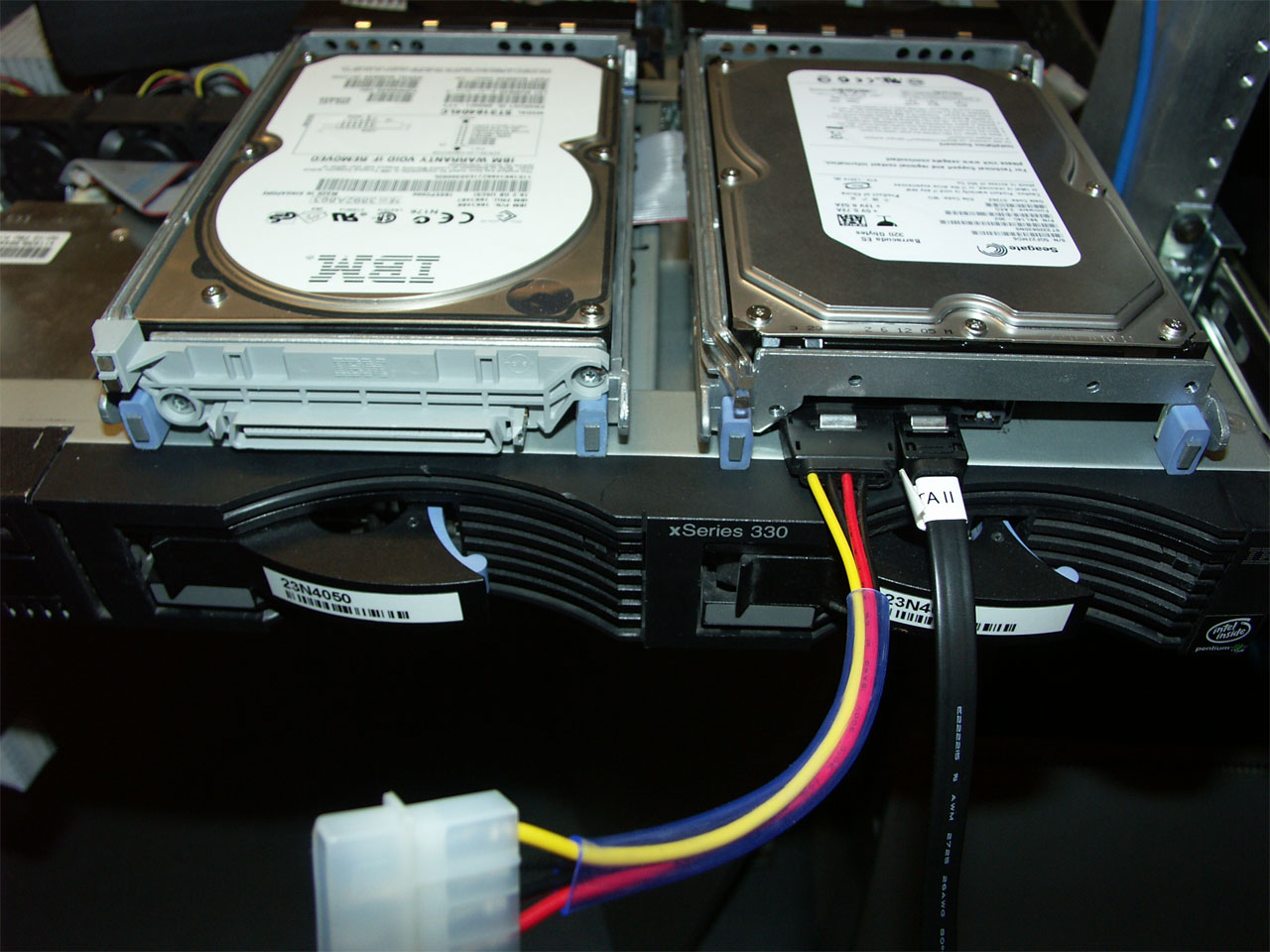
After buying a good set of drives and a controller, I started running into some snags. The most obvious was the lack of standard 5v/12v accessory power. The x330 has a 24-pin header that provides power to the SCSI backplane. Using a multi-meter, I was able to locate the necessary contacts. If your server lacks molex power connectors as well, you will need to trace these down. My best advice is to triple check your readings and use an older drive to test the connection before you hook up your new drives. Nothing like all that work, followed by a puff of the magic black smoke flying out of your new drives :). The right eight pins are the ones we want.
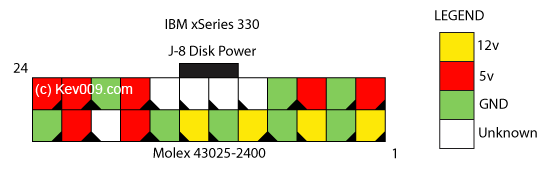
To make a nice cable, you will need a Molex 43025-2400 connector and 4 to 8 pins. While I waited for mine to come in, I just pressed a power cable wire by wire into the connections to make contact.
The next potential point of struggle is getting the drives mounted in the trays. The x330 trays have a plastic SCSI SCA pass through on the end. These were held on with a pair of security Torx screws, so you may need to get creative if you do not have the correct bit. The drives fit nicely at this point, but the SATA power connection was blocked by a metal corner of the tray. A quick bit of work with a file fixed this.
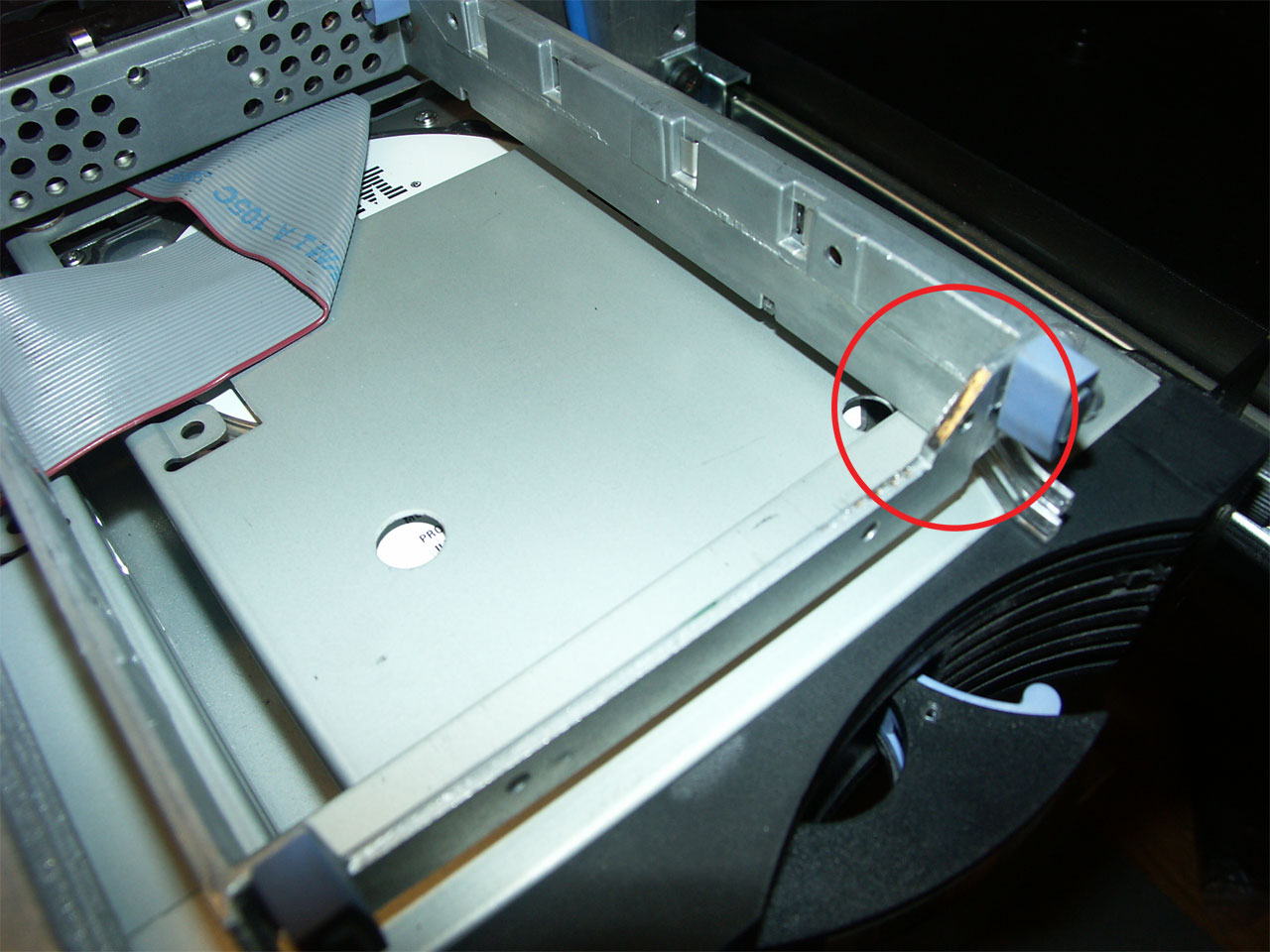
Pull the old hotswap backplane and cable up the new drives. At this point you should power on and see how it goes. Hopefully you wired the power cable correctly.
Now your server is capable of accepting inexpensive, high capacity SATA drives! The basic process should be the same for any 1U server lacking power connectors, though you may need to dig deeper to get to the 5v/12v source (power supply is a surefire bet).
Related posts:
- IBM NetVista 2800 Hacking Similar to the x330 SATA mod, I have some NetVista...
- Building NAS, Part 2 Building your own Network Attached Storage server In an earlier...
- I dream of pervasive virtualization… I dream of a day where virtualization is pervasive. Instead...
Nice. This is quite an improvement over the SCSI storage. What type of SATA controller did you use? I’m interested in implementing this modification on my x330, but I am currently experiencing problems trying to get an OS installed. Any ideas you have would be more than welcomed. Go here for more info:
I used your article as a guide to fit 2 x 300GB ATA133 drives into my xSeries 335 with great results. I found that the BIOS doesn’t support HDD >137GB, so I will have to buy a 3rd party controller as the latest BIOS available doesn’t provide this feature.
Great article, there is very limited info on the Internet for xSeries hacks.
Nice one. I’ve got two of those servers. I’m designing a new pcb SATA back plain to replace the current SCSI one. So the drives will still be hot swappable :) Send me an email if you’re interested in the schematics and board files.
Great idea.
Hey roy.
I would like the schematics for that, but i cant find your email
Could you mail them to browsem * at * gmail com
Br Browsem
Hi Roy, I’m thinking of buying a 2nd hand x346 and modity it to fit 4 SATA HD’s. Could you please also send me your schematics? My email address is freindebib at hotmail. Thank you
My mail host server is a x330, and I was just going to replace scsi with sata. I would want the backplane as well, willing to pay for parts and labour.
lundman at lundman.net
For what it’s worth, I also have a recently acquired x346 that I’ve been playing with. My biggest problem is that it seems to be unstable (constantly reboots) if the power to the SCSI backplane isn’t plugged in. There’s an addon card attached to my backplane, similar results if that card is removed with the rest of the backplane plugged in.
Did you run into similar problems with this server? I’m hoping that if I put a load on the power rails, the problem will go away, but I’m not hopeful. I’ll try and get back to poking it with a meter later on this week.
If I can’t eliminated the backplane, I’ll have to fold it over and take out 4 fans, which I’d like to avoid.
Hello!
Which sata controller did you use. Is it possible to use any PCI sata controller in this server?
@Jan
I used a 3ware SATA raid card.. search my other posts from this time period for experiences with it.
I would suspect most PCI SATA cards will work. I have also used a 133MHz 64-bit PCI Silicon Image card in the IBM x345. That would be fine if your OS has good software RAID (Linux, Solaris, BSD).
I’m trying to convert my x346 to SATA too. Has anyone managed this sucessfully? if you have please let me know. ashley.gale3 at gmail
Hi!
I bought a used Megaraid 300-8X card for my x335, so I hope it will work.
@Ashley
What specific problem do you have? The process will be essentially the same but may require a bit of ingenuity to get power to all the bays since there are six.
@Jan
I’ve since upgraded to a x335 for the box this article was written about, so you will likely have good results.
My problem is that the backplane is for SCSI only. I have looked into adaptors, but cannot seem to find the right product. I’m now looking into replacing the whole backplane with a newer one that can handle SATA.
kev, where did you harvest power for your sata disks in your 335?
@Jan
I believe it was the same/similar connector as the one detailed in this post. The servers are 2000 miles away from me so I can’t take a look for you until March.
@Ashley
Yes, if you take a look at the pictures in the post I hacked the bay and trays to accept SATA drives (albeit non-hotswap) on the x330. The process would be similar for the x346, though you will have 3x the cabling.
If this is a commercial application, you are better off buying an external SATA JBOD and using the internal SCSI bays for the operating system.
You may also wish to look into the System x 3650 which is the successor to the x346. Very nice octo-core capable machines and relatively cheap on the used market. These support SAS which is cross compatible with SATA.
Just installed my megaraid card and it works perfectly!
I’m only missing the molex plug. Kev, where did you buy the plug?